 Veva
MCP server
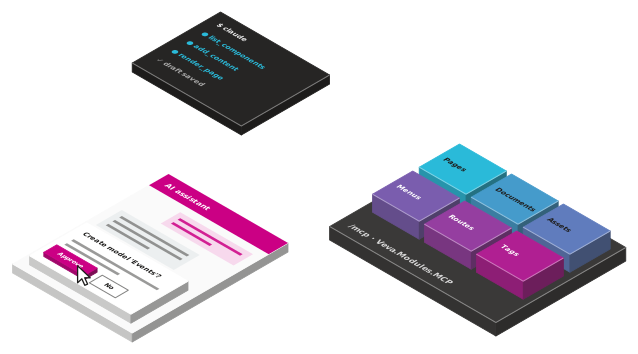
Veva.Modules.MCP The MCP server at /mcp and the admin's AI assistant. Each module adds its tools: pages, documents, assets, tags, menus and routes.
dotnet add package Veva.Modules.MCPModules · Veva.Modules.MCP
Turn on the AI assistant and editors ask for pages, documents and images in plain words, with the permissions they already have. The same tools are an MCP server at /mcp, so coding agents build against the running site.
The AI assistant
Veva.Modules.AI.OpenAI provides the model. The assistant's loop and tools come with Veva.
Turn it on per website, and an AI assistant button in the admin opens a chat about that website.
It adds pages and components, writes and translates documents, files assets and edits menus.
Every tool call is checked against the permissions of the person asking, as the admin checks them.
Creating a model, deleting data, changing many documents or a model's fields waits for a yes.
Attach images, PDFs or text files. With an image provider set, it generates images into the library.
Pick the AI provider per website, such as OpenAI, and steer every conversation with a system prompt.
The MCP server
Veva.Modules.MCP owns /mcp, and each module adds its tools to it. The Pages, Documents and Assets tools come with Veva.Web.Essentials.
Create and move pages, add components, import a content tree, render a page and publish it.
Design models from templates, search, write and translate documents, update many at once.
Upload files or fetch them from a URL, search the library, set up folders, generate images.
Hand-built menus, routing rules with a route tester, and tags in categories.
get_type_info describes any public Veva type, and list_components reads each component's hint.
Deleted pages, content and documents can be restored. Page content is saved as a draft.
How an agent connects
01
An api key, or in development the agent account BuildVeva() sets up.
Veva:DevAuth02
Point the agent's MCP client at /mcp, with the key as a bearer token.
/mcp03
The agent reads the site's templates, pages and components first.
get_site_overview04
It adds pages, components, documents and assets, as an editor would.
add_content05
It reads the HTML a page serves and the issues the designer would show.
render_pageFor developers
Add the server to the client's settings. The X-Veva-Tool-Confirmation header says the client asks its user before each tool call, so the tools that need a yes can run. Setting it is the developer's decision.
Extend the assistant and the server from a module:
IAiChatProvider: an AI provider for the assistantIAiImageProvider: image generation for the assistantIMcpToolPermissions: who may run your module's toolsAgentHint: tells agents what your component is for{
"mcpServers": {
"veva": {
"type": "http",
"url": "https://localhost:5001/mcp",
"headers": {
"Authorization": "Bearer ${VEVA_AGENT_KEY}",
"X-Veva-Tool-Confirmation": "client"
}
}
}
}
Modules
The ones marked Built in come with Veva.Web.Essentials. Add the others as packages, restart, and set them up in the site's settings.
Veva.Modules.MCP The MCP server at /mcp and the admin's AI assistant. Each module adds its tools: pages, documents, assets, tags, menus and routes.
dotnet add package Veva.Modules.MCPVeva.Modules.ContentImport Imports Word, PDF and image files as page content: upload, review the proposed components, then insert them.
dotnet add package Veva.Modules.ContentImportVeva.Modules.AI.OpenAI OpenAI chat and image generation for the Veva AI assistant.
dotnet add package Veva.Modules.AI.OpenAIMore of Veva
Each one is made of modules. Reference a package, restart, and its components are in the editor.
Compose pages from components, then preview and publish
OpenComponents that show, components that fetch, and the binding between them
OpenStructured content you list, filter and serve anywhere
OpenDocument forms that save, generic forms that filter or post
OpenForm answers made into a PDF, downloaded or sent to be signed
OpenOne media library, with images sized on request
OpenCrawl, index and search the whole site
OpenBuildVeva(), modules, components, themes and hooks
OpenPlain .NET Blazor: three render modes, standard components
OpenData sources, sign-in, mail, analytics and media
OpenEvery module: what comes with Essentials, and the add-ons
Open