 Veva
Essentials
Veva.Web.Essentials Veva.Web.Core plus pages and the designer, documents, forms, navigation menus, routing, cookie consent, logging and background tasks.
dotnet add package Veva.Web.EssentialsFeatures · Module library
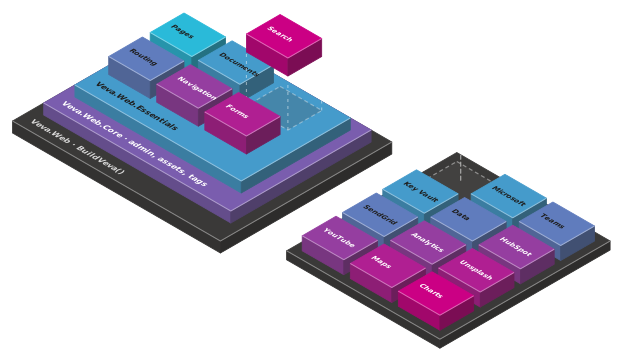
Veva is built from modules, and each module is a NuGet package. Veva.Web.Essentials brings three layers and the modules inside them. The add-ons are packages you reference when the site needs them.
Start here
Each package includes the one below it. Most sites start with Veva.Web.Essentials and nothing else.
Veva.Web.Essentials Veva.Web.Core plus pages and the designer, documents, forms, navigation menus, routing, cookie consent, logging and background tasks.
dotnet add package Veva.Web.EssentialsVeva.Web.Core Veva.Web plus the admin, the asset library, tags, the audit log and the setup wizard.
dotnet add package Veva.Web.CoreVeva.Web The host: BuildVeva(), the module loader, components, themes and data binding.
dotnet add package Veva.WebVeva runs on SQL Server by default. For PostgreSQL 18 or later, add Veva.Web.PostgreSql and set Veva:Database:Provider to PostgreSql. Add-ons with tables of their own, such as Passkeys and Content import, have a .PostgreSql package too. Search manager doesn't have one yet.
Built in
Every module here comes with Veva.Web.Essentials. The ones marked Web core also come with Veva.Web.Core on its own.
Veva.Modules.Admin The admin at /veva: the editing views, the Users, Websites and Versions sections, and the e-mail settings.
dotnet add package Veva.Modules.AdminVeva.Modules.Assets The media library, with files at /library addresses and images resized, cropped and sharpened on request. Adds the Image, Images, Video and Audio components.
dotnet add package Veva.Modules.AssetsVeva.Modules.Tags Predefined tags for any content that takes them, kept in the Tags section, and a Tag List component.
dotnet add package Veva.Modules.TagsVeva.Modules.AuditLogging Records what users do through the admin, in the Audit Logs section. By default requests are kept 90 days and changes a year.
dotnet add package Veva.Modules.AuditLoggingVeva.Modules.Setup The first-run wizard at /veva/setup: it connects the database, creates the first user and website, then restarts the site.
dotnet add package Veva.Modules.SetupVeva.Modules.MCP The MCP server at /mcp and the admin's AI assistant. Each module adds its tools: pages, documents, assets, tags, menus and routes.
dotnet add package Veva.Modules.MCPVeva.Modules.Pages Renders the pages: finds the website, page, template and theme, serves the 404 page and security headers, and holds the page settings.
dotnet add package Veva.Modules.PagesVeva.Modules.Pages.Design The Pages section of the admin, and the designer's tools in the page: select components, drag them and set their properties.
dotnet add package Veva.Modules.Pages.DesignVeva.Modules.StandardViewComponents 48 components, from Heading, Paragraph and Link to Tabs, Data Table, Navigation menu and Bread crumbs, and styling options such as margin and padding.
dotnet add package Veva.Modules.StandardViewComponentsVeva.Modules.Documents Models and their documents, in the Documents section. Adds the Document List, Document, Linked documents and Document Form components.
dotnet add package Veva.Modules.DocumentsVeva.Modules.Documents.ModelTemplates Starter models to create a model from: Articles (News) and an Employee list.
dotnet add package Veva.Modules.Documents.ModelTemplatesVeva.Modules.Documents.ViewEndpoints.Standard Serves a model's documents as RSS, XML or JSON, through endpoints set up on the model.
dotnet add package Veva.Modules.Documents.ViewEndpoints.StandardVeva.Modules.Documents.ViewEndpoints.ICAL Serves a model's documents as an iCalendar feed, so events go straight into a calendar.
dotnet add package Veva.Modules.Documents.ViewEndpoints.ICALVeva.Modules.FormComponents Form fields of every kind, form steps, a sum to solve and the PDF generator, for the Document Form and the Generic Form.
dotnet add package Veva.Modules.FormComponentsVeva.Modules.Navigation Hand-built menus in the Navigation section, which the Navigation menu component shows.
dotnet add package Veva.Modules.NavigationVeva.Modules.Routing The route table in the Routing section: 301 and 302 redirects, and routes that keep the address. Also alternative addresses for a page.
dotnet add package Veva.Modules.RoutingVeva.Modules.Components.Authentication Login form, Create Account Form, Forgotten Password Form, User profile form, Authorized Area and two-factor set-up.
dotnet add package Veva.Modules.Components.AuthenticationVeva.Modules.SingleSignOn Signs people in through another Veva site that runs Veva.Modules.SingleSignOn.Host.
dotnet add package Veva.Modules.SingleSignOnVeva.Modules.CookieConsent A consent banner and settings dialog per website, with consent categories, and the Cookie declaration and Cookie settings button components.
dotnet add package Veva.Modules.CookieConsentVeva.Modules.Logging Writes the site's log to the database, and shows it in the Logs section, filtered or live.
dotnet add package Veva.Modules.LoggingVeva.Modules.TaskDaemon The Tasks section: schedule background tasks by interval or cron, run one now, and read its history and log.
dotnet add package Veva.Modules.TaskDaemonVeva.Modules.Tasks.Hangfire Runs the task daemon's tasks on Hangfire, with Hangfire's dashboard for administrators at /_veva/hangfire.
dotnet add package Veva.Modules.Tasks.HangfireVeva.Modules.MarkdownParsing.MarkdigParser Renders the Markdown in Paragraph text with Markdig, with syntax highlighting in code blocks.
dotnet add package Veva.Modules.MarkdownParsing.MarkdigParserVeva.Modules.StaticIcons Icons from a folder of the site's wwwroot, shown inline as SVG. A theme registers the provider.
dotnet add package Veva.Modules.StaticIconsAdd-ons
Each add-on is a package of its own. Add it, restart, and set it up in the site's settings.
Veva.Modules.SearchManager The index, ranking, moderated results, search analytics and the Web search component.
dotnet add package Veva.Modules.SearchManagerVeva.Modules.SearchCrawler Crawls the site from its start address and sitemap into the Search manager's index.
dotnet add package Veva.Modules.SearchCrawlerVeva.Modules.Pdf.PDFPig Lets the crawler index PDF files, and reads their metadata when they are uploaded to the library.
dotnet add package Veva.Modules.Pdf.PDFPigVeva.Modules.Office.NPOI Lets the crawler read and index Word and Excel files.
dotnet add package Veva.Modules.Office.NPOIVeva.Modules.SearchManager.Embeddings.Onnx Semantic search with a multilingual embedding model run in the web process, on the CPU or the GPU. Nothing leaves the server.
dotnet add package Veva.Modules.SearchManager.Embeddings.OnnxVeva.Modules.SearchManager.Embeddings.OpenAiCompatible Semantic search with an embedding model on another server, through an OpenAI-compatible embeddings API.
dotnet add package Veva.Modules.SearchManager.Embeddings.OpenAiCompatibleVeva.Modules.Authentication.Microsoft Editors sign in to the Veva backend with their Microsoft account.
dotnet add package Veva.Modules.Authentication.MicrosoftVeva.Modules.Authentication.Google Editors sign in to the Veva backend with their Google account.
dotnet add package Veva.Modules.Authentication.GoogleVeva.Modules.Authentication.Facebook Editors sign in to the Veva backend with their Facebook account.
dotnet add package Veva.Modules.Authentication.FacebookVeva.Modules.Authentication.Auth0 Editors sign in to the Veva backend through your Auth0 tenant, and new users get the roles you choose.
dotnet add package Veva.Modules.Authentication.Auth0Veva.Modules.Authentication.OIDC Sign-in through any OpenID Connect provider. A setting decides whether it also lets people into the Veva backend.
dotnet add package Veva.Modules.Authentication.OIDCVeva.Modules.Authentication.IAS Sign-in with Ísland.is (IAS) from a link on your pages. A setting decides whether it also lets people into the Veva backend.
dotnet add package Veva.Modules.Authentication.IASVeva.Modules.Signet.Login Sign-in through the Signet Login website, or with an electronic ID: Auðkenni SIM, the Auðkenni app or Evrotrust.
dotnet add package Veva.Modules.Signet.LoginVeva.Modules.Authentication.Dokobit A sign-in component for electronic ID through the Dokobit Identity Gateway. It can create users at first sign-in and add them to roles.
dotnet add package Veva.Modules.Authentication.DokobitVeva.Modules.Passkeys Passwordless sign-in with passkeys (FIDO2/WebAuthn): components to sign in, register a passkey and manage the ones you have.
dotnet add package Veva.Modules.PasskeysVeva.Modules.SingleSignOn.Host Makes this site the sign-in host for your other Veva sites.
dotnet add package Veva.Modules.SingleSignOn.HostVeva.Modules.DataSources Shows data from other systems on your pages. Add .HTTP, .SQL or .WebScraping for the source you read.
dotnet add package Veva.Modules.DataSourcesVeva.Modules.DataSources.Documents Copies data source items into documents and keeps their fields up to date.
dotnet add package Veva.Modules.DataSources.DocumentsVeva.Modules.Microsoft.Teams Posts newly added documents to a Teams channel through an incoming webhook.
dotnet add package Veva.Modules.Microsoft.TeamsVeva.Modules.AzureKeyVault Keeps the site's secrets and RSA keys in Azure Key Vault.
dotnet add package Veva.Modules.AzureKeyVaultVeva.Modules.Hubspot Embeds a HubSpot form, so submissions go straight to HubSpot.
dotnet add package Veva.Modules.HubspotVeva.Modules.Puppeteer Renders the PDF generator's layout as an A4 PDF in headless Chromium, with each website's margins, header and footer.
dotnet add package Veva.Modules.PuppeteerSignetSignature.VevaComponents Sends a generated PDF to Signet Signature to be signed, with a field for each signer and components to follow the documents.
dotnet add package SignetSignature.VevaComponentsVeva.Modules.Mail.SendGrid Sends the site's e-mail through SendGrid.
dotnet add package Veva.Modules.Mail.SendGridVeva.Modules.Mail.MailKitMailer Sends the site's e-mail through any SMTP server.
dotnet add package Veva.Modules.Mail.MailKitMailerVeva.Modules.Mailchimp Adds the documents saved in a model, such as sign-ups from a Document Form, as subscribers to a Mailchimp audience.
dotnet add package Veva.Modules.MailchimpVeva.Modules.CampaignMonitor Adds the documents saved in a model, such as sign-ups from a Document Form, as subscribers to a Campaign Monitor list.
dotnet add package Veva.Modules.CampaignMonitorVeva.Modules.GoogleAnalytics Adds Google Analytics, waiting for cookie consent or sending consent signals.
dotnet add package Veva.Modules.GoogleAnalyticsVeva.Modules.GoogleTagManager Adds a Tag Manager container, waiting for cookie consent or sending consent signals.
dotnet add package Veva.Modules.GoogleTagManagerVeva.Modules.CookieHub Adds CookieHub's consent banner, set up with your CookieHub account ID.
dotnet add package Veva.Modules.CookieHubVeva.Modules.Unsplash Adds Unsplash photos to the Add Content dialog.
dotnet add package Veva.Modules.UnsplashVeva.Modules.Pexels Adds Pexels photos and videos to the Add Content dialog.
dotnet add package Veva.Modules.PexelsVeva.Modules.Components.YouTube A YouTube video component. Paste a YouTube address into the Add Content dialog to insert one.
dotnet add package Veva.Modules.Components.YouTubeVeva.Modules.Components.Vimeo A Vimeo video component. Paste a Vimeo address into the Add Content dialog to insert one.
dotnet add package Veva.Modules.Components.VimeoVeva.Modules.Components.GoogleMaps A Google Maps component. Paste a map into the Add Content dialog to insert one.
dotnet add package Veva.Modules.Components.GoogleMapsVeva.Modules.Infogram Browse your Infogram account in the Add Content dialog and embed a chart with a click.
dotnet add package Veva.Modules.InfogramVeva.Modules.ReadSpeaker A Listen button that reads the page, or a part of it, aloud through ReadSpeaker. Set your ReadSpeaker customer ID in the website settings.
dotnet add package Veva.Modules.ReadSpeakerVeva.Modules.FontAwesome Font Awesome icons for the Icon component and the icon picker.
dotnet add package Veva.Modules.FontAwesomeVeva.Modules.FontAwesomePro Font Awesome Pro icons for the Icon component and the icon picker, in place of the free set.
dotnet add package Veva.Modules.FontAwesomeProVeva.Modules.AnimateCSS A component modifier that puts an Animate.css animation on any component.
dotnet add package Veva.Modules.AnimateCSSVeva.Modules.Components.Swiper Sliders and carousels, built on the Swiper library.
dotnet add package Veva.Modules.Components.SwiperVeva.Modules.ChartJS Chart components, such as a bar chart and a line chart, built on Chart.js.
dotnet add package Veva.Modules.ChartJSVeva.Modules.Components.GoogleReCaptcha A reCAPTCHA field for forms such as the Document Form, to keep spam bots out.
dotnet add package Veva.Modules.Components.GoogleReCaptchaVeva.Modules.Hypen A component modifier that hyphenates text in the browser, with Icelandic and English patterns.
dotnet add package Veva.Modules.HypenVeva.Modules.Arnastofnun Hyphenates content on the server by Árnastofnun's Icelandic rules, and can stem Icelandic words in the search catalog.
dotnet add package Veva.Modules.ArnastofnunVeva.Modules.ContentImport Imports Word, PDF and image files as page content: upload, review the proposed components, then insert them.
dotnet add package Veva.Modules.ContentImportVeva.Modules.AI.OpenAI OpenAI chat and image generation for the Veva AI assistant.
dotnet add package Veva.Modules.AI.OpenAIHow it works
01
Add the package to the site's project.
dotnet add package02
Veva finds the package's module at startup and loads it. Program.cs stays as it is.
IModule03
A module with settings adds them to the website settings in the admin.
04
Its components are in the Add Content dialog, ready to place on a page.
Your own module
A module is a class that implements IModule. It registers your components, hooks and services, and Veva loads it with the rest.
More of Veva
Each one is made of modules. Reference a package, restart, and its components are in the editor.
Compose pages from components, then preview and publish
OpenComponents that show, components that fetch, and the binding between them
OpenStructured content you list, filter and serve anywhere
OpenDocument forms that save, generic forms that filter or post
OpenForm answers made into a PDF, downloaded or sent to be signed
OpenOne media library, with images sized on request
OpenCrawl, index and search the whole site
OpenThe admin's AI assistant, and the MCP server coding agents connect to
OpenBuildVeva(), modules, components, themes and hooks
OpenPlain .NET Blazor: three render modes, standard components
OpenData sources, sign-in, mail, analytics and media
Open