 Veva
Sign-in components
Veva.Modules.Components.Authentication Login form, Create Account Form, Forgotten Password Form, User profile form, Authorized Area and two-factor set-up.
dotnet add package Veva.Modules.Components.AuthenticationModules · integrations
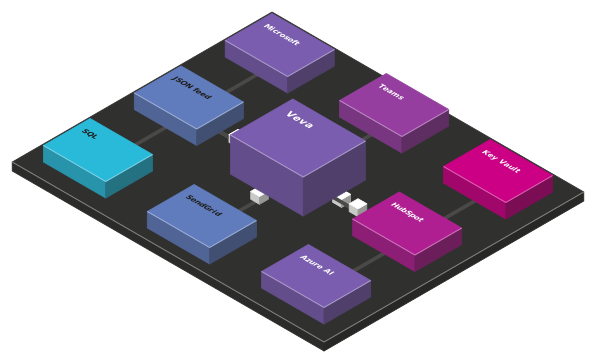
Show live data from other systems on your pages, let people sign in with an account they already have, and plug in the mail, marketing, analytics and media services you use. Each one is a package.
Data sources
Veva.Modules.DataSources reads other systems and hands each item to your components.
The HTTP data source reads an address with your headers and caches the answer. Parsers take JSON paths, XPath or RSS.
Run a SELECT against a named connection string and list the rows.
Read fields from another site's HTML with CSS selectors.
A sync task copies data source items into documents and keeps their fields up to date.
A Data source list puts each item in the data binding, so {name} works in any text.
Scheduled and one-off tasks run on Hangfire, through the task daemon.
How it works
01
A REST api, an XML or RSS feed, a web page or SQL Server.
02
The HTTP or SQL data source fetches the data and caches it.
IDataSource03
JSON, XML, RSS or HTML become items with named fields.
IDataSourceParser04
Each item goes into the data binding context.
DataSourceList05
Placeholders such as {name} show the values.
Modules
The ones marked Built in come with Veva.Web.Essentials. Add the others as packages, restart, and set them up in the site's settings.
Veva.Modules.Components.Authentication Login form, Create Account Form, Forgotten Password Form, User profile form, Authorized Area and two-factor set-up.
dotnet add package Veva.Modules.Components.AuthenticationVeva.Modules.SingleSignOn Signs people in through another Veva site that runs Veva.Modules.SingleSignOn.Host.
dotnet add package Veva.Modules.SingleSignOnVeva.Modules.CookieConsent A consent banner and settings dialog per website, with consent categories, and the Cookie declaration and Cookie settings button components.
dotnet add package Veva.Modules.CookieConsentVeva.Modules.Authentication.Microsoft Editors sign in to the Veva backend with their Microsoft account.
dotnet add package Veva.Modules.Authentication.MicrosoftVeva.Modules.Authentication.Google Editors sign in to the Veva backend with their Google account.
dotnet add package Veva.Modules.Authentication.GoogleVeva.Modules.Authentication.Facebook Editors sign in to the Veva backend with their Facebook account.
dotnet add package Veva.Modules.Authentication.FacebookVeva.Modules.Authentication.Auth0 Editors sign in to the Veva backend through your Auth0 tenant, and new users get the roles you choose.
dotnet add package Veva.Modules.Authentication.Auth0Veva.Modules.Authentication.OIDC Sign-in through any OpenID Connect provider. A setting decides whether it also lets people into the Veva backend.
dotnet add package Veva.Modules.Authentication.OIDCVeva.Modules.Authentication.IAS Sign-in with Ísland.is (IAS) from a link on your pages. A setting decides whether it also lets people into the Veva backend.
dotnet add package Veva.Modules.Authentication.IASVeva.Modules.Signet.Login Sign-in through the Signet Login website, or with an electronic ID: Auðkenni SIM, the Auðkenni app or Evrotrust.
dotnet add package Veva.Modules.Signet.LoginVeva.Modules.Authentication.Dokobit A sign-in component for electronic ID through the Dokobit Identity Gateway. It can create users at first sign-in and add them to roles.
dotnet add package Veva.Modules.Authentication.DokobitVeva.Modules.Passkeys Passwordless sign-in with passkeys (FIDO2/WebAuthn): components to sign in, register a passkey and manage the ones you have.
dotnet add package Veva.Modules.PasskeysVeva.Modules.SingleSignOn.Host Makes this site the sign-in host for your other Veva sites.
dotnet add package Veva.Modules.SingleSignOn.HostVeva.Modules.DataSources Shows data from other systems on your pages. Add .HTTP, .SQL or .WebScraping for the source you read.
dotnet add package Veva.Modules.DataSourcesVeva.Modules.DataSources.Documents Copies data source items into documents and keeps their fields up to date.
dotnet add package Veva.Modules.DataSources.DocumentsVeva.Modules.Microsoft.Teams Posts newly added documents to a Teams channel through an incoming webhook.
dotnet add package Veva.Modules.Microsoft.TeamsVeva.Modules.AzureKeyVault Keeps the site's secrets and RSA keys in Azure Key Vault.
dotnet add package Veva.Modules.AzureKeyVaultVeva.Modules.Hubspot Embeds a HubSpot form, so submissions go straight to HubSpot.
dotnet add package Veva.Modules.HubspotVeva.Modules.Mail.SendGrid Sends the site's e-mail through SendGrid.
dotnet add package Veva.Modules.Mail.SendGridVeva.Modules.Mail.MailKitMailer Sends the site's e-mail through any SMTP server.
dotnet add package Veva.Modules.Mail.MailKitMailerVeva.Modules.Mailchimp Adds the documents saved in a model, such as sign-ups from a Document Form, as subscribers to a Mailchimp audience.
dotnet add package Veva.Modules.MailchimpVeva.Modules.CampaignMonitor Adds the documents saved in a model, such as sign-ups from a Document Form, as subscribers to a Campaign Monitor list.
dotnet add package Veva.Modules.CampaignMonitorVeva.Modules.GoogleAnalytics Adds Google Analytics, waiting for cookie consent or sending consent signals.
dotnet add package Veva.Modules.GoogleAnalyticsVeva.Modules.GoogleTagManager Adds a Tag Manager container, waiting for cookie consent or sending consent signals.
dotnet add package Veva.Modules.GoogleTagManagerVeva.Modules.CookieHub Adds CookieHub's consent banner, set up with your CookieHub account ID.
dotnet add package Veva.Modules.CookieHubVeva.Modules.Unsplash Adds Unsplash photos to the Add Content dialog.
dotnet add package Veva.Modules.UnsplashVeva.Modules.Pexels Adds Pexels photos and videos to the Add Content dialog.
dotnet add package Veva.Modules.PexelsVeva.Modules.ReadSpeaker A Listen button that reads the page, or a part of it, aloud through ReadSpeaker. Set your ReadSpeaker customer ID in the website settings.
dotnet add package Veva.Modules.ReadSpeakerFor developers
A data source fetches, a parser turns the answer into items. Register both, and editors pick them in a Data source list.
Data, mail and background work.
public async Task<DataSourceItemsResult> ParseItemsAsync(object data)
{
    var rows = JsonConvert.DeserializeObject<List<Product>>(data.ToString());
    var items = rows.Select(row => new DataSourceItem
    {
        Identifier = row.Sku,
        Values = new Dictionary<string, object>
        {
            ["name"] = row.Name,
            ["price"] = row.Price,
        },
    }).ToList();

    return new DataSourceItemsResult { Items = items, TotalItems = items.Count, QueryKey = QueryKey };
}

// services.AddNamed<IDataSourceParser, ProductParser>(ServiceLifetime.Transient);
Keep reading
Sign editors in with Microsoft Entra ID.
Read the guideGive signed-in users their Veva roles.
Read the guideSend the site's e-mail over SMTP.
Read the guideMore of Veva
Each one is made of modules. Reference a package, restart, and its components are in the editor.
Compose pages from components, then preview and publish
OpenComponents that show, components that fetch, and the binding between them
OpenStructured content you list, filter and serve anywhere
OpenDocument forms that save, generic forms that filter or post
OpenForm answers made into a PDF, downloaded or sent to be signed
OpenOne media library, with images sized on request
OpenCrawl, index and search the whole site
OpenThe admin's AI assistant, and the MCP server coding agents connect to
OpenBuildVeva(), modules, components, themes and hooks
OpenPlain .NET Blazor: three render modes, standard components
OpenEvery module: what comes with Essentials, and the add-ons
Open