 Veva
Extension points
Shape requests, pages and startup.
Veva core · Veva.Web
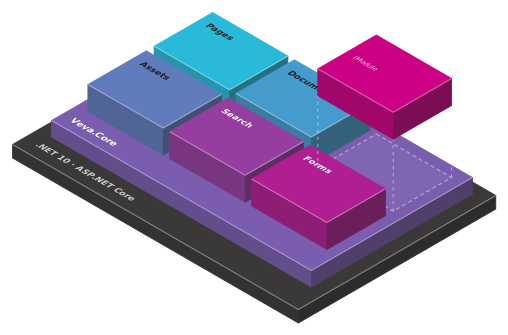
builder.BuildVeva() gives you the host. Modules load themselves, pages route by wildcard, and the editor, the admin API and an MCP endpoint come with it. Everything else is a package.
What it does
BuildVeva() sets up routing, sign-in, static assets and the setup wizard, on SQL Server or PostgreSQL.
A module is a class that implements IModule. It registers services, components, hooks and endpoints.
EditorBrowsable properties become settings, AgentHint tells AI agents what a component is for.
A theme sets the layout, breakpoints, CSS classes and colour palettes. Templates hold its settings.
Bind {_PageTitle}, a query string value or a document field into any text, in every render mode.
An MCP endpoint at /mcp gives AI agents the editor's tools, with the same permissions.
How a request is served
01
Every path outside /_, /veva, /api and /library is a page address.
02
The page is found, then routing rules run for redirects and other addresses.
IRoutingRule03
Page request hooks and the theme add the layout, scripts and meta tags.
IPageRequestHook04
The layout renders the template's areas. Each component runs through its render hooks.
IContentRenderHook05
HTML in the page's render mode: prerendered, interactive, or static for bots.
ComponentRenderModeFor developers
BuildVeva() replaces the Blazor boilerplate. Your own code goes in modules, which Veva finds and loads at startup.
Shape requests, pages and startup.
using Veva.Web;

var builder = WebApplication.CreateBuilder(args);
var app = builder.BuildVeva();
app.Run();

// A module of your own, found and loaded at startup
public class MyThemeModule : IModule
{
    public string Name => "My Theme";
    public int Priority => (int)ModulePriorityEnum.Default;

    public void ConfigureServices(IServiceCollection services, IConfiguration configuration)
    {
        services.AddNamed<ITheme, MyTheme>(Name);
    }
}
Keep reading
The unit every feature of Veva is built from.
Read the guideLayouts, breakpoints and CSS classes.
Read the guideThe widths the designer previews.
Read the guideModules
All of them come with Veva.Web.Essentials.
Veva.Web.Essentials Veva.Web.Core plus pages and the designer, documents, forms, navigation menus, routing, cookie consent, logging and background tasks.
dotnet add package Veva.Web.EssentialsVeva.Web.Core Veva.Web plus the admin, the asset library, tags, the audit log and the setup wizard.
dotnet add package Veva.Web.CoreVeva.Web The host: BuildVeva(), the module loader, components, themes and data binding.
dotnet add package Veva.WebVeva.Modules.Admin The admin at /veva: the editing views, the Users, Websites and Versions sections, and the e-mail settings.
dotnet add package Veva.Modules.AdminVeva.Modules.AuditLogging Records what users do through the admin, in the Audit Logs section. By default requests are kept 90 days and changes a year.
dotnet add package Veva.Modules.AuditLoggingVeva.Modules.Setup The first-run wizard at /veva/setup: it connects the database, creates the first user and website, then restarts the site.
dotnet add package Veva.Modules.SetupVeva.Modules.MCP The MCP server at /mcp and the admin's AI assistant. Each module adds its tools: pages, documents, assets, tags, menus and routes.
dotnet add package Veva.Modules.MCPVeva.Modules.Pages Renders the pages: finds the website, page, template and theme, serves the 404 page and security headers, and holds the page settings.
dotnet add package Veva.Modules.PagesVeva.Modules.Routing The route table in the Routing section: 301 and 302 redirects, and routes that keep the address. Also alternative addresses for a page.
dotnet add package Veva.Modules.RoutingVeva.Modules.Logging Writes the site's log to the database, and shows it in the Logs section, filtered or live.
dotnet add package Veva.Modules.LoggingVeva.Modules.TaskDaemon The Tasks section: schedule background tasks by interval or cron, run one now, and read its history and log.
dotnet add package Veva.Modules.TaskDaemonVeva.Modules.Tasks.Hangfire Runs the task daemon's tasks on Hangfire, with Hangfire's dashboard for administrators at /_veva/hangfire.
dotnet add package Veva.Modules.Tasks.HangfireMore of Veva
Each one is made of modules. Reference a package, restart, and its components are in the editor.
Compose pages from components, then preview and publish
OpenComponents that show, components that fetch, and the binding between them
OpenStructured content you list, filter and serve anywhere
OpenDocument forms that save, generic forms that filter or post
OpenForm answers made into a PDF, downloaded or sent to be signed
OpenOne media library, with images sized on request
OpenCrawl, index and search the whole site
OpenThe admin's AI assistant, and the MCP server coding agents connect to
OpenPlain .NET Blazor: three render modes, standard components
OpenData sources, sign-in, mail, analytics and media
OpenEvery module: what comes with Essentials, and the add-ons
Open