 Veva
Image actions
Resize, crop and sharpen images through their address.
Read the guideModule · Veva.Modules.Assets
One media library for every file on the site. Folders give files stable /library/ addresses, and each image is resized, cropped and sharpened on the server for the place it appears.
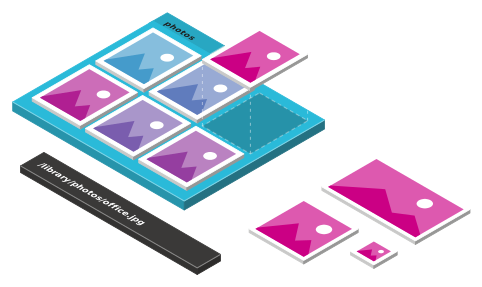
What it does
A folder's alias puts its files at /library/folder/file. The permanent link, /library/?itemid=, never changes.
Add width, fit, cover, crop or sharpen actions to an image's address and get that version back.
A folder can accept one file type only, and run an image procedure on every image uploaded to it.
Save a focus point on an image, so crops keep what matters.
EXIF and IPTC are read into the library. Processed images leave GPS and other metadata out.
The Unsplash and Pexels modules add a tab to the Add Content dialog, so editors pick photos in place.
How it works
01
In the admin, from a url, from Unsplash or Pexels, or over MCP.
02
The folder's alias, file type and image procedure apply.
Image procedure03
Add actions to the address, such as &action=cover:800x800.
/library/?itemid=04
The server makes that version on its first request and keeps it.
05
In an Image component, or as {image.FriendlyUrl} in a document.
For developers
IAssetUrlService builds the address of an asset at the size you need, from a property or from a document field in the data binding.
Change how images are made or where files come from. In Veva.Modules.Assets.Domain:
IImageProcedureStepHandler: one step of an image procedureIActionParser: turns URL actions into stepsIMetaDataService: reads metadata from filesIAssetSource: a source of files in the Add Content dialog@inject IAssetUrlService AssetUrls <img src="@ImageUrl()" alt="@Image?.Description" loading="lazy" /> @code { [EditorBrowsable, Parameter, DisplayName("Image")] public AssetProperty Image { get; set; } // 800px wide, lightly sharpened private string ImageUrl() => Image?.AssetId is Guid id && id != Guid.Empty ? AssetUrls.GetAssetUrl( id, 800, null, ResizeMode.Fit, SharpenStrength.Light) : null; }
Keep reading
Resize, crop and sharpen images through their address.
Read the guideAn image property editors pick from the library.
Read the guideModules
The ones marked Built in come with Veva.Web.Essentials. Add the others as packages, restart, and set them up in the site's settings.
Veva.Modules.Assets The media library, with files at /library addresses and images resized, cropped and sharpened on request. Adds the Image, Images, Video and Audio components.
dotnet add package Veva.Modules.AssetsVeva.Modules.Pdf.PDFPig Lets the crawler index PDF files, and reads their metadata when they are uploaded to the library.
dotnet add package Veva.Modules.Pdf.PDFPigVeva.Modules.Unsplash Adds Unsplash photos to the Add Content dialog.
dotnet add package Veva.Modules.UnsplashVeva.Modules.Pexels Adds Pexels photos and videos to the Add Content dialog.
dotnet add package Veva.Modules.PexelsMore of Veva
Each one is made of modules. Reference a package, restart, and its components are in the editor.
Compose pages from components, then preview and publish
OpenComponents that show, components that fetch, and the binding between them
OpenStructured content you list, filter and serve anywhere
OpenDocument forms that save, generic forms that filter or post
OpenForm answers made into a PDF, downloaded or sent to be signed
OpenCrawl, index and search the whole site
OpenThe admin's AI assistant, and the MCP server coding agents connect to
OpenBuildVeva(), modules, components, themes and hooks
OpenPlain .NET Blazor: three render modes, standard components
OpenData sources, sign-in, mail, analytics and media
OpenEvery module: what comes with Essentials, and the add-ons
Open