 Veva
Using form steps
Split a long form into steps.
Read the guideModule · Veva.Modules.FormComponents
Editors build forms from fields, steps and checks, with no form code. A Document Form saves the answers as documents of a model. A Generic Form turns them into a query string for a filter or a search, or hands them to a submit handler of yours.
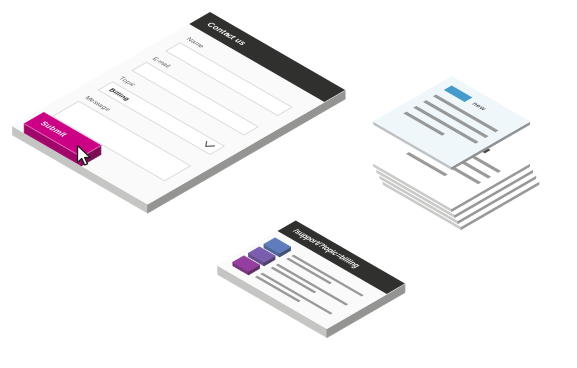
Two forms
Both take the same fields. They differ in where the answers go.
Writes into the documents system. Pick the model and the folders new documents go into, and each field's name is a field of that model.
?documentId=Its values become the query string of a page you pick, or of the page it is on, so a Document List or a Web search there filters by them.
Building blocks
Text, e-mail, number, range, date and time, checkboxes, radio buttons, drop-downs, files and hidden fields.
Show a group of fields only when another field has a given value. Sub forms gather repeated fields into one.
Form steps split a long form into a wizard. The navigator lists the steps and moves back and forth.
The PDF generator renders a layout of the answers to a PDF and hands it to its file handlers.
Required fields, patterns, a validation summary, a sum to solve, or Google reCAPTCHA as an add-on.
Submit, reset, set a field to a value, or run one of the form's actions such as Next or Back.
How a Document Form works
01
Set the form's Model, and the folders new documents go into.
Document Form02
Place input fields in the form. Each one's Field name is a field of the model.
FieldName03
Required fields and formats are checked before the form submits.
ICustomFormValidator04
A valid submit adds a document to the model and shows the form's submitted view.
05
With edit mode on, the same form opens a document from ?documentId=.
Enable edit modeFor developers
Implement IFormSubmitHandler and pick it as a Generic Form's Submit handler. It runs once per valid submit, and its result decides what the visitor sees next.
Hook into a form from your own code:
IFormSubmitHandler: saves or sends a Generic Form's answersICustomFormValidator: checks the answers togetherIFormInitialStateProvider: fills the fields before the form showspublic class ContactHandler : IFormSubmitHandler { private readonly ContactInbox _inbox; // your own service public ContactHandler(ContactInbox inbox) => _inbox = inbox; public async Task<FormSubmitResult> HandleAsync( FormSubmitRequest request, CancellationToken cancellationToken = default) { string email = request.ValueAsString("email"); if (await _inbox.IsBlockedAsync(email, cancellationToken)) return FormSubmitResult.Invalid("email", "Use another address."); await _inbox.AddAsync(request.Values, cancellationToken); return FormSubmitResult.Success("Thanks. We will be in touch."); } } // services.AddNamed<IFormSubmitHandler, ContactHandler>();
Keep reading
Split a long form into steps.
Read the guideProperties editors set, bound to document fields.
Read the guideModules
The ones marked Built in come with Veva.Web.Essentials. Add the others as packages, restart, and set them up in the site's settings.
Veva.Modules.Documents Models and their documents, in the Documents section. Adds the Document List, Document, Linked documents and Document Form components.
dotnet add package Veva.Modules.DocumentsVeva.Modules.FormComponents Form fields of every kind, form steps, a sum to solve and the PDF generator, for the Document Form and the Generic Form.
dotnet add package Veva.Modules.FormComponentsVeva.Modules.Hubspot Embeds a HubSpot form, so submissions go straight to HubSpot.
dotnet add package Veva.Modules.HubspotVeva.Modules.Puppeteer Renders the PDF generator's layout as an A4 PDF in headless Chromium, with each website's margins, header and footer.
dotnet add package Veva.Modules.PuppeteerVeva.Modules.Mailchimp Adds the documents saved in a model, such as sign-ups from a Document Form, as subscribers to a Mailchimp audience.
dotnet add package Veva.Modules.MailchimpVeva.Modules.CampaignMonitor Adds the documents saved in a model, such as sign-ups from a Document Form, as subscribers to a Campaign Monitor list.
dotnet add package Veva.Modules.CampaignMonitorVeva.Modules.Components.GoogleReCaptcha A reCAPTCHA field for forms such as the Document Form, to keep spam bots out.
dotnet add package Veva.Modules.Components.GoogleReCaptchaMore of Veva
Each one is made of modules. Reference a package, restart, and its components are in the editor.
Compose pages from components, then preview and publish
OpenComponents that show, components that fetch, and the binding between them
OpenStructured content you list, filter and serve anywhere
OpenForm answers made into a PDF, downloaded or sent to be signed
OpenOne media library, with images sized on request
OpenCrawl, index and search the whole site
OpenThe admin's AI assistant, and the MCP server coding agents connect to
OpenBuildVeva(), modules, components, themes and hooks
OpenPlain .NET Blazor: three render modes, standard components
OpenData sources, sign-in, mail, analytics and media
OpenEvery module: what comes with Essentials, and the add-ons
Open